Build a centralized, reusable question bank and generate accreditation-ready question papers through a guided, AI-assisted workflow — custom patterns, CO/Bloom's mapping, instant preview and multi-format export.
A guided workflow that turns a question bank into a generated, validated question paper.
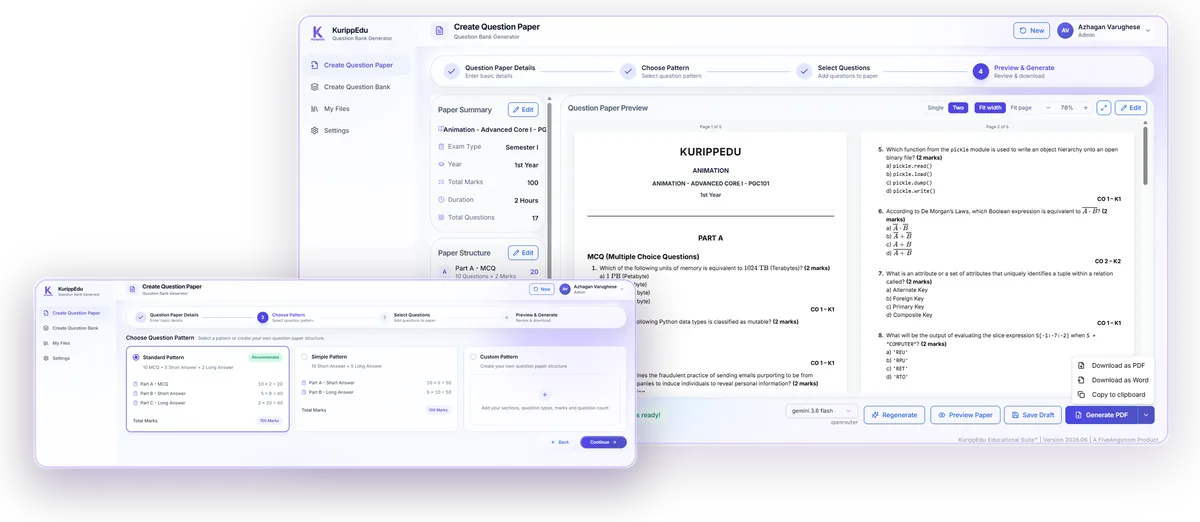
Choose a Standard or Simple pattern, or build your own: define parts, section titles, question types, count, sub-parts and marks per question — the pattern summary updates live as you build.
Select an AI model and let KurippEdu draw balanced questions from your bank — each one tagged with its difficulty level and Course Outcome / Knowledge-level (CO-K) mapping, ready for outcome-based education reporting.
Review the formatted, print-ready paper page by page — institution header, Part A/B/C structure, marks and CO-K tags all in place — with an editable Paper Summary and Structure panel alongside.
Total marks, question count, and section structure are checked automatically against your chosen pattern — catching mismatches before a paper ever reaches a student.
Generate a print-ready PDF, download an editable Word file, or copy the paper to your clipboard. Not quite right? Regenerate with one click or save a draft and come back later.
Because each generated question already carries its CO-K mapping, results flow straight into your IQAC attainment calculations — no separate tagging exercise after the exam.
Standardized quality, balanced difficulty, zero manual formatting.
A four-step guided flow replaces manual paper drafting entirely.
Marks and structure checked automatically before you ever hit generate.
CO-K mapping is built in — no retagging for accreditation reports.
Save a pattern once, reuse it every semester across faculty.
PDF, Word or clipboard — whichever your institution's workflow needs.
Save progress anytime — every draft is stored in My Files.
From a centralized question bank to a validated, downloadable paper — in one guided flow.

KurippEdu is a unified Education Suite that simplifies campus operations, automates workflows, and enhances learning experiences.

See how KurippEdu can help your institution operate smarter, faster, and more efficiently.